 Dreamwrite Studio
The most feature-rich writing studio available.
A full-featured writing studio with a binder, corkboard, snapshots, compile and publish support, and more. Saved in an open format that you own and control.
Organize
One binder holds your manuscript, research, and notes.
The binder
Folders and documents in whatever shape the book needs. Any document can hold others. Drag to rearrange.
Labels, status, keywords
Mark scenes by point of view, draft stage, or anything else, and add metadata fields of your own.
Collections and saved searches
Gather scenes by hand, or keep a search that updates itself as you write.
Split, merge, and hoist
Cut a long chapter in two, join short ones, or narrow the binder to the part you’re working on.
Research beside the draft
PDFs, images, web pages, audio, and video. Play an interview and drop timestamps as you transcribe it.
Templates with real examples
Novel, screenplay, stage play, thesis, nonfiction, poetry, and more, each optionally shown with a public-domain classic laid out to get you started.
Series
Share character and world folders across every book in a series.
Plan
See the shape of the story, and sculpt it until it’s right.
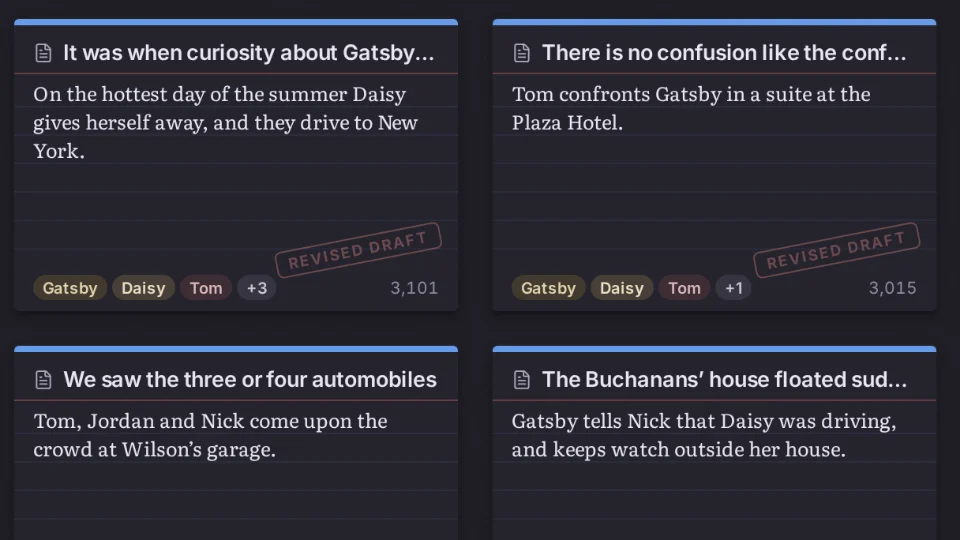
Corkboard
An index card for every scene: in a grid, in lanes by label, or loose on a freeform board.
Outliner
Synopses and any metadata as columns. Print the outline, or print the cards.
Timeline
Story events laid out in time. Trades data with Aeon Timeline.
Plot grid
Plotlines down the side and scenes across the top, so a dropped thread shows up as a gap.
Relationship map
Who shares scenes with whom, drawn from the manuscript itself.
Story structures
Three-act, Save the Cat, Hero’s Journey, Story Circle, Seven-Point, Kishōtenketsu, and the Snowflake Method.
Name generator
For the minor character you’ve been calling “Guard 2.”
Write
A quiet page that blocks distractions.
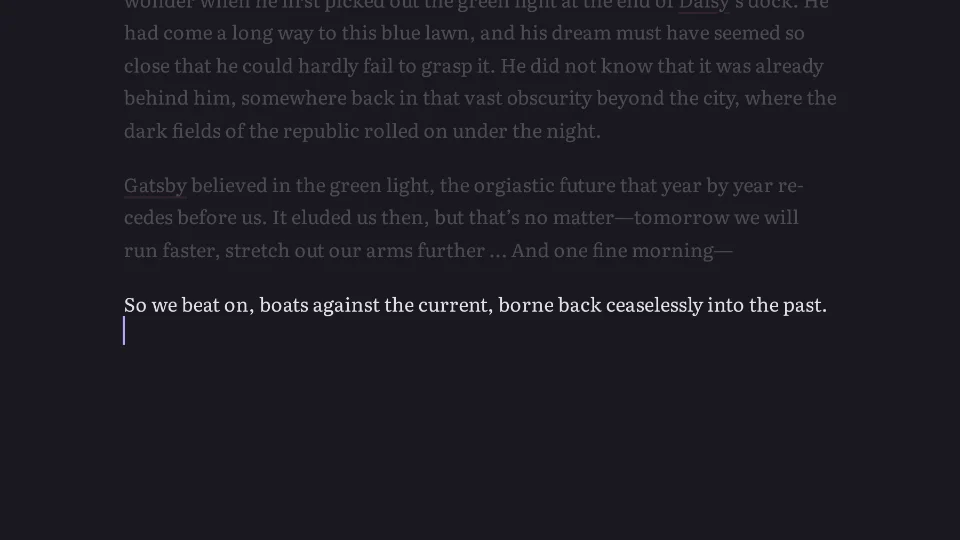
Document View
Create and organize separate files for distinct parts. Read and edit a chapter, or the whole book, as one long scroll.
Focus and composition modes
Dim everything but the sentence, paragraph, line, or dialogue. Go full screen over a backdrop, with typewriter scrolling.
Split editors and tabs
Your notes on one side, the scene on the other. Page view when you want to see pages.
The editing features you need
Spell check, a thesaurus, curly quotes and proper dashes, and optional grammar checking that runs on your own computer.
Links, footnotes, comments
[[Wiki links]] between documents with backlinks, footnotes, margin comments, and notes only you will see.
Screenplays and stage plays
Write in Fountain, formatted on the page as you go.
Revise
Editing is where great writing is made, and Dreamwrite Studio has the best feature set available.
Snapshots
Save a version of a scene before you tear into it. Compare word by word and roll back any time.
Tracked changes
Revision mode records each change, and the review pane lets you accept or reject them one by one.
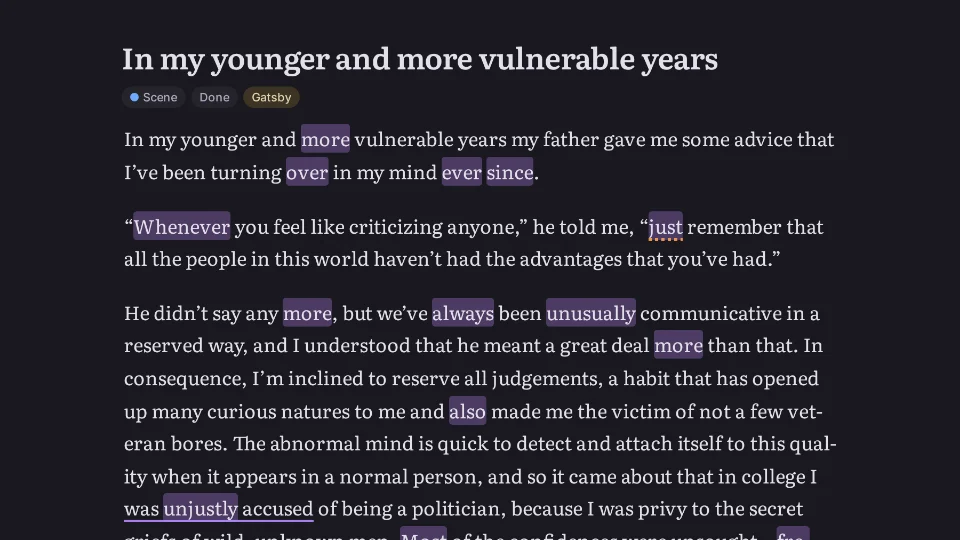
Linguistic focus
Light up adverbs, passive voice, filler words, clichés, or dialogue.
Consistency checks
Catch character misspellings, lore contradictions, and timeline slips.
Editors and co-authors
Send a review copy and merge their edits back as tracked changes, even after you’ve kept writing. Word files keep real tracked changes both ways.
Read aloud
Hear a scene in your computer’s own voice and catch what your eyes skipped.
Track
Keep yourself honest, and see your progress.
Targets and deadlines
Set a goal for the session, the draft, or one document. Dreamwrite works out the daily words to meet your deadline.
Writing history
A calendar heatmap, your streak, and the time you actually spent writing.
Sprints
Set a timer, write, and see what you wrote when it ends.
Statistics
Word counts, word frequency, and readability for the book or any selection.
Publish
Go from a blank canvas to a binder full of scenes to a finished book.
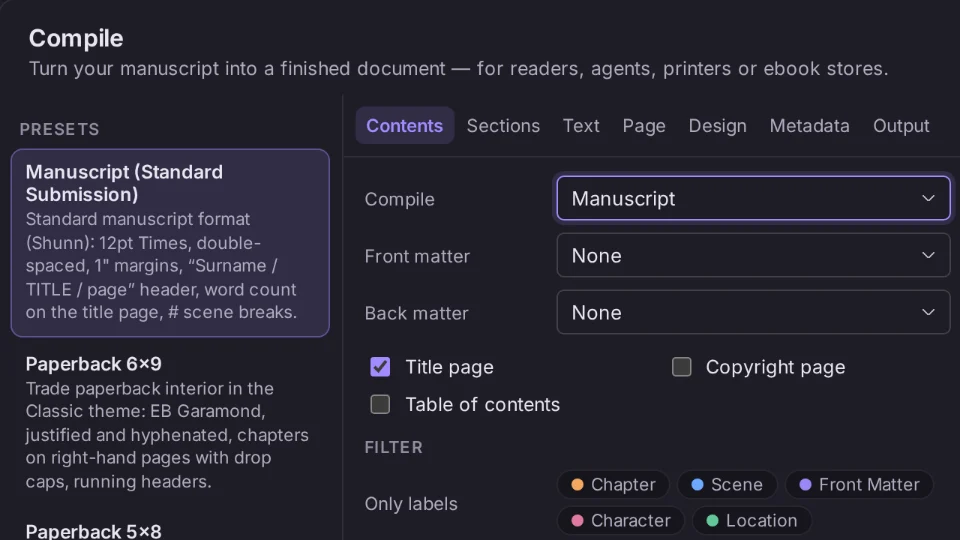
Every format you’ll be asked for
Word, PDF, EPUB 3, ODT, RTF, HTML, LaTeX, Markdown, plain text, Fountain, and Final Draft.
Presets to start from
Standard manuscript submission, trade paperback, ebook, screenplay, and academic paper.
Book typography
Typeset PDFs at your trim size, with drop caps, running heads, and no stranded lines.
Citations
Cite from Zotero or a BibTeX file, formatted in APA, Chicago, MLA, or any CSL style.
Blogs and newsletters
Post to WordPress, Ghost, or Micro.blog, or copy rich text for Substack and email.
Your layout, your rules
Section layouts, placeholders, and find-and-replace rules that run only when you compile.
Import
Bring the projects you already started.
Scrivener
The binder, synopses, notes, labels, snapshots, comments, and research all come along. Compare to Scrivener
Ulysses
Reads the library directly: groups, sheets, keywords, notes, goals, and images. Compare to Ulysses
Word, ODT, and RTF
Tracked changes and comments survive the trip. Split a long file into scenes at its headings.
Everything else
Markdown, HTML and web pages, Fountain, Final Draft, OPML, and Aeon Timeline.
Your files
Your book is a folder of plain text markdown files you can open, read, and edit anywhere.
Plain Markdown
Open any chapter in any text editor. Changes you make outside Dreamwrite show up in it at once.
Sync it your way
Dropbox, Google Drive, iCloud Drive, OneDrive, Syncthing, or Git. No Dreamwrite account necessary.
Private by design
Dreamwrite Studio has no analytics or tracking. Your writing stays on your computer and, optionally, the cloud of your choice.
Linux, Mac, and Windows
Dreamwrite Studio offers the same features on all three desktop operating systems, and one license covers every computer you write on.
Six languages
English, Deutsch, Español, Français, 日本語, and Português.
Keyboard and screen readers
Every command works from the keyboard, with shortcuts you can change, and the app works with screen readers.
A CLI for nerds
Outline, search, check, compile, and back up a project from the terminal with
dreamwrite.
Assistants
No AI is built in. If you want a second reader, you can bring your own.
Your assistant, if you choose
Connect Claude, Codex, or any MCP client in one step. Until you do, nothing in Dreamwrite talks to an AI.
Skills for editing that keep you as the author
Proofreading, line edits, continuity checks, beta-reader notes, developmental feedback, and a copyeditor’s style sheet.
Every change is a suggestion
Proposed edits arrive in redline. Accept them, reject them, or ignore them.
Off-limits when you say so
Hide any document from assistants with one command.
With Dreamwrite Studio, you will always be the author of your book.
Try every feature, free.
Fourteen days with everything turned on, and no account required. After that, one $25 payment covers every computer you write on, forever.
Compare to ScrivenerCompare to UlyssesRead the guideGive it as a gift